Actor4j - Core
SDK and Runtimes
Section titled “SDK and Runtimes”Actor4j - Core is separated into an SDK and interchangeable runtimes [10]. Actors, messages, pods and the other building blocks are defined in the SDK (actor4j-core-sdk). A runtime executes them. Actors written against the SDK run unchanged on every runtime, so you can develop first and choose (or switch) the runtime later, based on your workload.
| Runtime | Artifact | Message queues | Best for |
|---|---|---|---|
| Default | actor4j-core-runtime |
thread-bound | communicating actors grouped on the same thread |
| Classic | actor4j-core-runtime-classic |
one per actor, work-stealing thread pool | any actor distribution |
| Loom | actor4j-core-runtime-loom |
one per actor, on virtual threads | blocking I/O |
| Hybrid | actor4j-core-runtime-hybrid |
thread-bound (default) and work-stealing pool (classic), chosen per actor | steady thread-bound work next to briefly active coordination |
A library depends only on the SDK, an application adds the runtime of its choice (it includes the SDK transitively). Every runtime provides the class io.actor4j.core.ActorRuntime, so switching the runtime means switching the dependency. The SDK and the runtimes have no external dependencies. Only actor4j-core-runtime-extended (bounded queues, based on the default runtime) uses JCTools via actor4j-core-jctools.
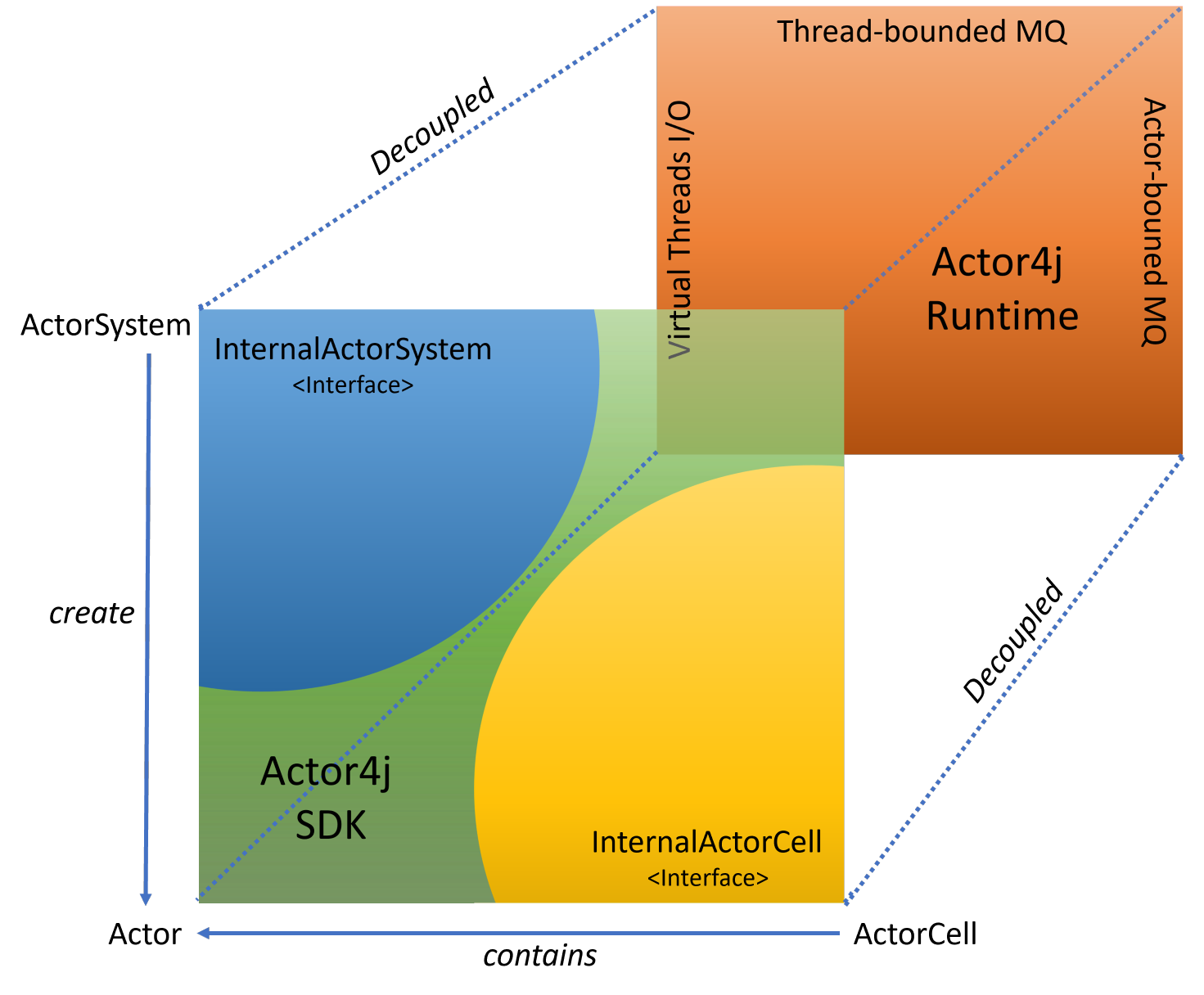
Fig. 1: Multi-runtime architecture of Actor4j (© 2025 IEEE, from [10])
In the default runtime, an actor has no own message queue. The queues belong to the thread that executes the actor (thread-bound queues, see Fig. 2 bottom). Messages between actors on the same thread (intra-communication) are passed without synchronization. Actors that communicate a lot can be grouped on the same thread (see ActorGroupMember). The classic runtime uses one queue per actor and schedules the actors on a work-stealing thread pool, like Akka (see Fig. 2 top). The Loom runtime executes actors on virtual threads. The hybrid runtime combines the default and the classic runtime in one actor system (see Hybrid Runtime).
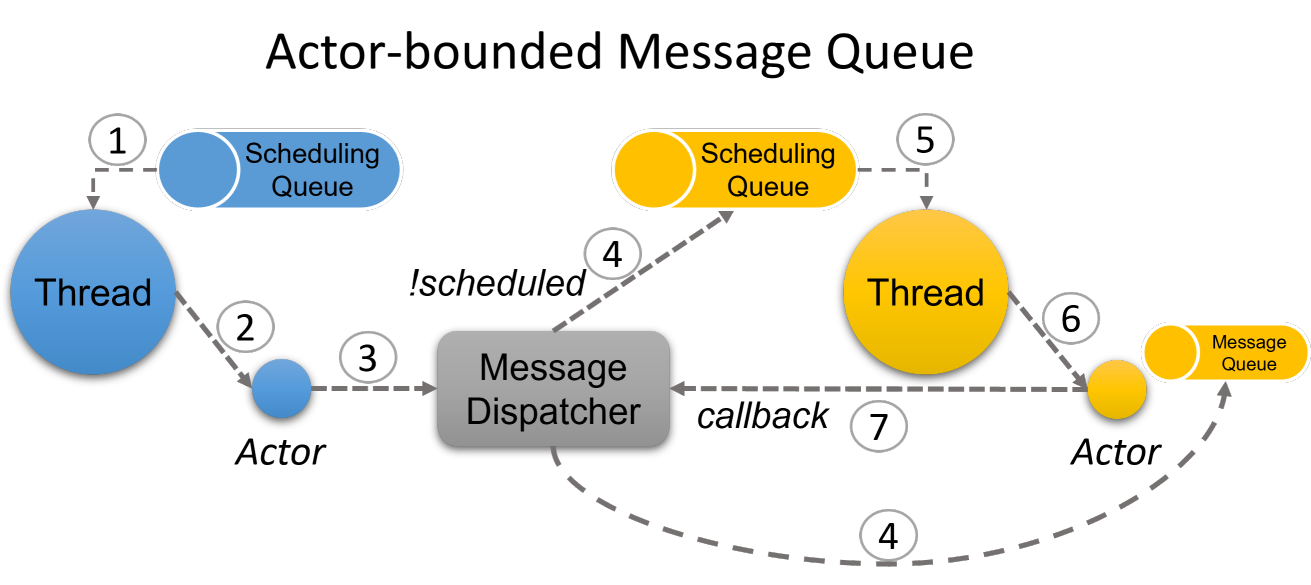
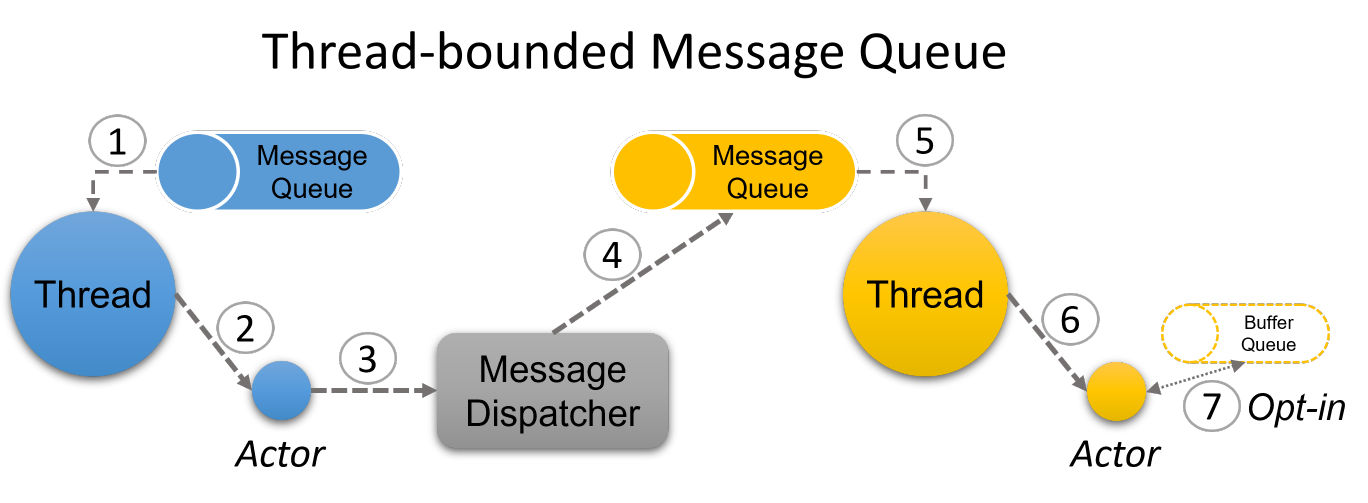
Fig. 2: Actor-bound message queues (top, classic runtime) and thread-bound message queues (bottom, default runtime) (© 2025 IEEE, from [10])
The default runtime uses several task-specific queues per thread (see Fig. 3). The thread pool architecture and the benchmarks are described in [10].
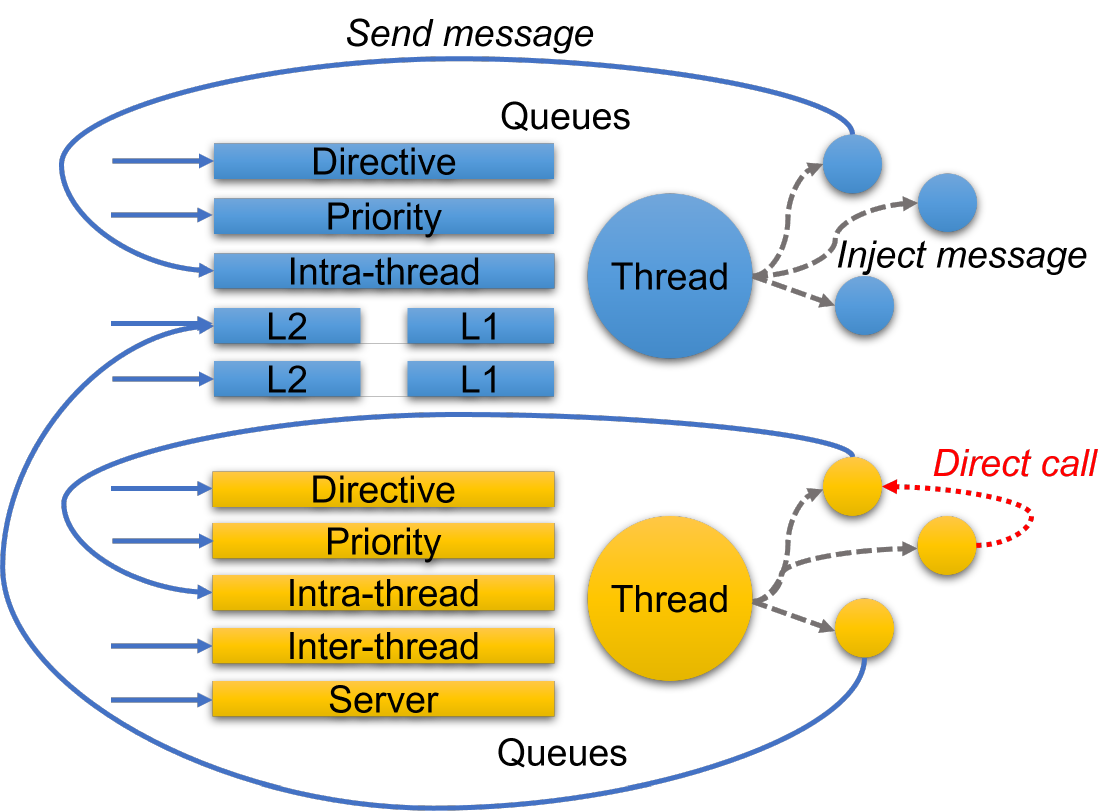
Fig. 3: Thread pool architecture of the default runtime with task-specific queues (© 2025 IEEE, from [10])
Hybrid Runtime
Section titled “Hybrid Runtime”The hybrid runtime (since 2.5.0) combines the default and the classic runtime: actors are thread-bound as in the default runtime, actors chosen by a placement rule run in the work-stealing pool of the classic runtime. This separates the work by its type, e.g. long-lived actors with steady load (actor pods, devices, groups of communicating actors on one thread) stay on their threads, while coordinators that are only briefly active (scatter-gather, sagas, fan-out) run in the pool and do not queue up behind the steady load.
// placement by markerclass Coordinator extends Actor implements PooledActor { ... }
// or by rule, without changing the actor codeActorSystem system = HybridActorRuntime.create(HybridActorSystemConfig.builder() .pooledPlacement(actor -> actor.getClass().getName().startsWith("com.example.coordination.")) .pooledParallelism(8) // pooled threads, default max(2, thread-bound/2) .parallelism(16) // thread-bound threads, default half of the cores .build());Without placement rule (no PooledActor), the hybrid runtime behaves like the default runtime.
Configuration, Starting and Stopping the Actor System
Section titled “Configuration, Starting and Stopping the Actor System”In actor4j, the following important configuration options are available.
ActorSystemConfig config = ActorSystemConfig.builder()  .parallelism(1)  .parallelismFactor(1)//  .parkMode() [default] or .sleepMode() .yieldMode();//  ...  .build();
ActorSystem system = ActorSystem.create(ActorRuntime.factory(), config); // using factory methodActorSystem system = ActorRuntime.create(config);orActorSystem system = ActorSystem.create(ActorRuntime.factory());ActorSystem system = ActorRuntime.create(); // with default config
On the one hand, the number of threads can be set with parallelism and the scaling factor with parallelismFactor:
Number of threads = parallelism * parallelismFactor
In addition, it can be defined by the configuration in which Modi the threads are operating if the situation occurs that temporarily no messages are received. The actor system is started with the method call:
system.start();The actor system can be terminated with a controlled shutdown of all actors or neither. A stop directive is sent internally to all actors with a controlled shutdown. Through parameter transfer, it is possible to determine whether the calling thread waits until the shutdown of the actor system has been completely terminated.
system.shutdown(); // normal shutdownsystem.shutdown(true); // shutdown and wait
system.shutdownWithActors(); // shutdown with actorssystem.shutdownWithActors(true);
Actor4j solves a controlled shutdown by sending a termination message to the user actor (father node of all actors, tree structure), resulting in the other subordinate actors terminating in a cascade form. The actors themselves are responsible for the orderly handling of their termination.
Actors, Pattern Matching, and Behaviour
Section titled “Actors, Pattern Matching, and Behaviour”Actors are added to the actor system via a factory method (ActorFactory). The factory is kept by the actor system, so that the actor can be instantiated again (e.g., on a restart). Actors can be generated outside the actor system. These are automatically subordinated to the user actor (father of all user-generated actors). However, they can also be generated within an actor, but these are then child actors of the corresponding actor. After instantiation, the function returns a unique ActorId (unambiguous identification of the actor).
Creating Actors
Section titled “Creating Actors”// using a factory methodsystem.addActor(new ActorFactory() { @Override public Actor create() { return new MyActor(); }});
// or as lambdaActorId myActor = system.addActor(() -> new MyActor());
// within an actor, as child actorActorId myChild = addChild(() -> new MyActor());Actors must derive from the class Actor and implement the receive method. In the example below, MyActor waits for a message containing a String and outputs it via a logger. Subsequently, the message is sent back to the sender. When a different message is received, a warning (unhandled (message)) is outputted if debugUnhandled has been set in the actor system. [1]
public class MyActor extends Actor { @Override public void receive(ActorMessage<?> message) { if (message.value() instanceof String) { logger().info(String.format( "Received String message: %s", message.valueAsString())); send(message, message.source()); } else unhandled(message); }}/* Adapted for actor4j according to [1] */Messages
Section titled “Messages”Messages can be sent using the send method. The following methods are available. Tell offers a similar syntax to Akka. A message can also be forwarded (forward). Aliases are, among other things, available to access an actor without knowing its ActorId. An actor that was made accessible from outside with expose() can be addressed by its global UUID (sendViaGlobalId). Messages can also be sent with priority (will be delivered with priority).
send(ActorMessage<?> message)send(ActorMessage<?> message, ActorId dest)sendViaPath(ActorMessage<?> message, String path)sendViaAlias(ActorMessage<?> message, String alias)sendViaGlobalId(ActorMessage<?> message, UUID globalId)tell(T value, int tag, ActorId dest)tell(T value, int tag, ActorId dest, String domain)tell(T value, int tag, ActorId dest, UUID interaction)tell(T value, int tag, ActorId dest, UUID interaction, String protocol)tell(T value, int tag, ActorId dest, UUID interaction, String protocol, String domain)tell(T value, int tag, String alias)tell(T value, int tag, String alias, UUID interaction)tell(T value, int tag, String alias, UUID interaction, String protocol)tell(T value, int tag, String alias, UUID interaction, String protocol, String domain)
forward(ActorMessage<?> message, ActorId dest)forward(ActorMessage<?> message, String alias)priority(ActorMessage<?> message)priority(ActorMessage<?> message, ActorId dest)priority(T value, int tag, ActorId dest)
Outside of an actor, messages are sent via the actor system (system.send(...), system.sendViaAlias(...), system.broadcast(...)). Messages are created with ActorMessage.create(value, tag, source, dest) (further variants with interaction, protocol and domain).
Messages that can be exchanged between the actors are of the ActorMessage<T> type. A message (see Table 1) consists of the object to be transferred (payload of the message), a tag that helps differentiate between messages, the sender address of the message, the receiver address of the message, an interaction ID for messages related to an interaction protocol (conversation) and the associated domain of the message. Methods for sending messages within the actor can be called (see above).
The structure of the ActorMessage<T> looks like that:
| Type | Name | Description |
|---|---|---|
| T | value | payload of the message |
| int | tag | tags help for differentiating between messages |
| ActorId | source | source of the message |
| ActorId | dest | destination of the message |
| UUID | interaction | associated interaction |
| String | protocol | interaction protocol |
| String | domain | domain of the message |
Tab. 1: Structure of the ActorMessage<T> |
Pattern Matching
Section titled “Pattern Matching”Pattern matching can be used with the ActorMessageMatcher class to receive messages. This class was inspired by pattern matching in Scala [2]. The message can be checked to match a tag, source, or class of the passed object (value). If a match is true, an action is triggered. This example is based on the top, except that this is expressed by the language means of the class ActorMessageMatcher. Tags serve as a simple means of communication. ACK would be such a tag.
public class MyActor extends Actor {  protected ActorMessageMatcher matcher;  protected final int ACK = 1;
  @Override  public void preStart() {    matcher = new ActorMessageMatcher();
    matcher    .match(String.class,      msg -> logger().info(String.format(        "Received String message: %s", msg.valueAsString())))    .match(ACK,      msg -> logger().info("ACK tag received"))    .matchAny(      msg -> send(msg, msg.dest()))    .matchElse(      msg -> unhandled(msg));  }
  @Override  public void receive(ActorMessage<?> message) {    matcher.apply(message);  }}
MatchAny is constantly triggered, no matter the message received. If no match is found, MatchElse is fired.
Behaviour
Section titled “Behaviour”Actor4j offers two ways to change the behaviour of an actor. With become and unbecome, the behaviour is changed as a side effect inside receive. With a BehaviourActor, every behaviour returns the next one, so each change of state is visible in the code. For new actors with several states, the second way is recommended. become remains for simple cases and existing code.
become and unbecome
Section titled “become and unbecome”The message processing method receive of an actor can be replaced by another method at runtime (HotSwap to Akka [3]). In the example below, the actor’s behavior is changed (on receipt of a tag SWAP). Upon receipt of the following message, information about the received message is outputted. Finally, the behavior with unbecome is returned to the original receive method.
public class MyActor extends Actor {  protected final int SWAP=22;
  @Override  public void receive(ActorMessage<?> message) {    if (message.tag() == SWAP)      become(msg -> {        logger().info(String.format(          "Received message: %s", msg));        unbecome();      }, false); // false -> putted on stack    else      unhandled(message);  }}
With await, an actor waits for a specific message (by source, tag or predicate, optionally with a timeout). The behaviour is replaced until the message arrives. unbecomeAll returns to the original receive method.
Behaviours as return value
Section titled “Behaviours as return value”A behaviour (ActorBehaviour) handles a message and returns how to go on. Each state of the actor is a method that takes the message. It is kept once as a named field, so a change of state is a simple return and creates no new objects.
public class Ping extends BehaviourActor {  protected final ActorBehaviour ping = ActorBehaviour.named("PING", this::ping);  protected final ActorBehaviour paused = ActorBehaviour.named("PAUSED", this::paused);
  @Override  protected ActorBehaviour initial() {    return ping;  }
  protected ActorBehaviour ping(ActorMessage<?> message) {    switch (message.tag()) {      case PONG -> {        tell(null, PING, message.source());        return ActorBehaviour.same();      }      case PAUSE -> {        return paused;      }      case QUIT -> {        return ActorBehaviour.stopped();      }      default -> {        return ActorBehaviour.unhandled();      }    }  }
protected ActorBehaviour paused(ActorMessage<?> message) { return message.tag()==RESUME ? ping : ActorBehaviour.unhandled(); }}| Return value | Meaning |
|---|---|
ActorBehaviour.same() |
stay with the current behaviour |
another behaviour, e.g. paused |
change to this behaviour |
ActorBehaviour.unhandled() |
the message is not handled, unhandled(message) of the actor is called |
ActorBehaviour.stopped() |
stop the actor |
ActorBehaviour.initial() |
back to the initial behaviour of the actor |
ActorBehaviour.empty() |
change to a behaviour where every message is unhandled |
ActorBehaviour.ignore() |
change to a behaviour that silently drops every message |
ActorBehaviour.named(...) gives a behaviour a name. The name of the current behaviour is available via state(), e.g. for logging. initial() is meant for building blocks that do not know their actor, such as await. Within the actor, simply return the field.
After a restart, the actor starts again with its initial behaviour, because a restart creates a new instance. become and unbecome are not supported by a BehaviourActor (they would bypass the returned behaviours). Messages with the tag TERMINATED from children that stop by themselves or from watched actors arrive in the current behaviour as usual.
Waiting (await)
Section titled “Waiting (await)”await returns a behaviour that waits for a specific message (by tag or predicate, optionally with a timeout). The waiting behaviour is created per request, because it holds the timer of the timeout.
protected ActorBehaviour request() { tell(null, REQUEST, server); return ActorBehaviour.named("WAITING", await(RESPONSE, (message) -> { handle(message); return idle; }, 1, TimeUnit.SECONDS, () -> ActorBehaviour.initial())); // timeout: back to the start}Other messages are not swallowed while waiting. They go to the behaviour that was current when await was called (or to an explicitly given behaviour otherwise), and waiting goes on. If this behaviour returns stopped(), waiting ends and the actor stops.
Behaviours in any actor
Section titled “Behaviours in any actor”The logic of a BehaviourActor lives in an ActorBehaviourContext. An actor that already has another base class (e.g. a PodChildActor or a PseudoActor) can use behaviours by holding such a context:
public class Device extends PodChildActor {  protected final ActorBehaviour offline = ActorBehaviour.named("OFFLINE", this::offline);  protected final ActorBehaviour online = ActorBehaviour.named("ONLINE", this::online);  protected final ActorBehaviourContext behaviours = new ActorBehaviourContext(this, () -> offline);
  @Override  public void receive(ActorMessage<?> message) {    behaviours.receive(message);  }
  protected ActorBehaviour offline(ActorMessage<?> message) { ... }  protected ActorBehaviour online(ActorMessage<?> message) { ... }}
Simple Example
Section titled “Simple Example”// Initialize the actor systemActorSystem system = ActorSystem.create(ActorRuntime.factory(), "Example");
// Creation of actor pongActorId pong = system.addActor(() -> new Actor() { @Override public void receive(ActorMessage<?> message) { // Receives message from ping System.out.println(message.valueAsString()); // Sends message "pong" to ping tell("pong", 0, message.source()); }});// Creation of actor pingActorId ping = system.addActor(() -> new Actor() { @Override public void receive(ActorMessage<?> message) { if (message.value()!=null) // Receives message from pong System.out.println(message.valueAsString()); // Sends message "ping" to pong tell("ping", 0, pong); }});
// Starts the actor systemsystem.start();
// Sends a message to ping to start the ping-pong processsystem.send(ActorMessage.create(null, 0, system.SYSTEM_ID(), ping));
// Lifetime for the ping-pong processtry { Thread.sleep(2000);} catch (InterruptedException e) { e.printStackTrace();}// Wait until all actors are shut downsystem.shutdownWithActors(true);Life Cycle of Actors and Monitoring
Section titled “Life Cycle of Actors and Monitoring”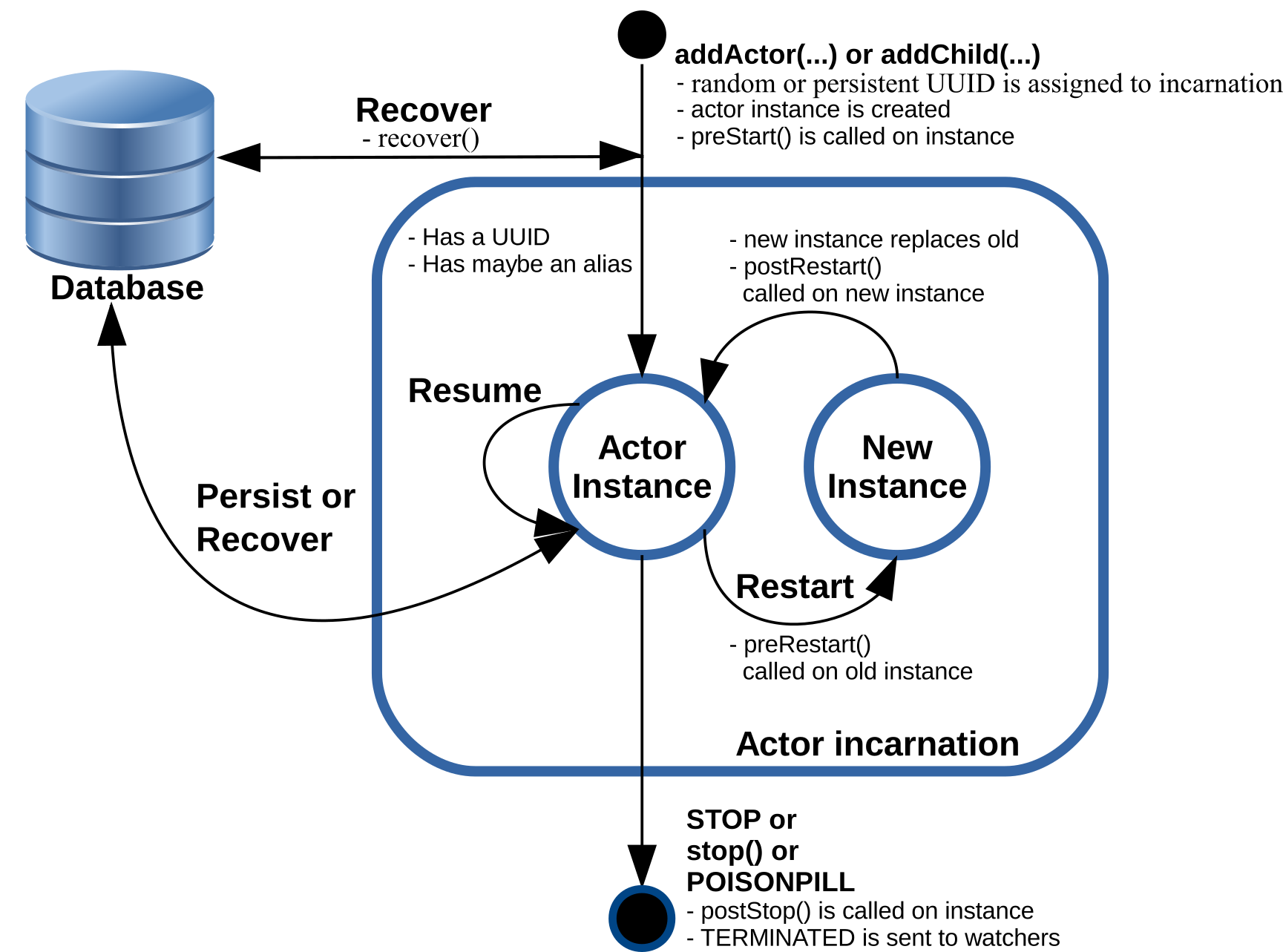
Fig. 4: Representation of the life cycle of an actor (adapted for actor4j according to [1])
Life Cycle
Section titled “Life Cycle”As already mentioned, actors are either instantiated via system.addActor(...) or parentActor.addChild(...). Actors then receive their local ActorId as a unique address, with which they can then communicate with other actors (sending messages). A global UUID is only foreseen for access from outside and must be explicitly exposed (expose()). A PersistentActor has a persistent UUID (persistenceId) [10]. An actor can also have an alternative identifier, the alias (for better legibility or when the ActorId is not previously known). The preStart method is initially called by the actor’s first awakening. This method will be used for the first initializations of the actor. It will also be called the method recover if the actor is a PersistentActor. This method recovers then the state of the actor. An actor can also be restarted, usually triggered by an exception (see chapter Supervision). In this case, the old instance preRestart is called first. Then a new instance is generated with the actor’s factory. The new instance replaces the old instance, and the method postRestart is called by the new instance. The preRestart and postRestart methods are used so that the actor can react adequately to the restart situation. The marking (ActorId) of the original actor is retained. This also guarantees that references from other actors to this actor will stay valid. An actor can be stopped by calling the stop method or receiving the STOP or POISONPILL message. [1][4]
Monitoring
Section titled “Monitoring”An actor can also monitor another actor for that it has not yet terminated itself. If the observed actor is terminated, a message TERMINATED is sent to the observer. An assignment is then made via message.source, corresponding to the sender’s ActorId. With watch, an observer can register with an actor and de-register with unwatch. [1]
watch(ActorId dest)unwatch(ActorId dest)Comparison to Akka
Section titled “Comparison to Akka”The life cycle and monitoring are mainly similar to Akka’s approach. Instead of a ActorId, an ActorRef is returned when an actor is instantiated.
Supervision
Section titled “Supervision”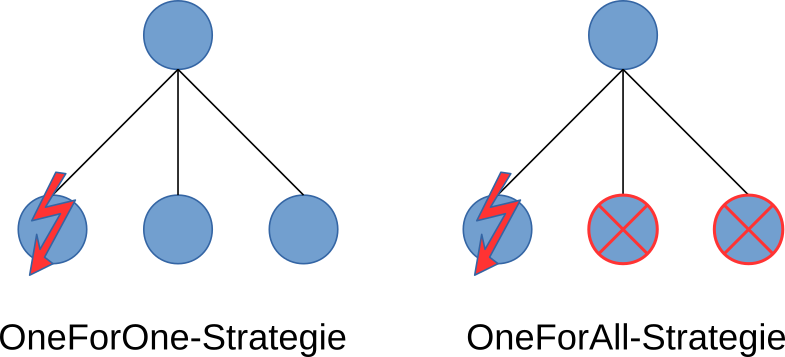
Fig. 5: OneForOne-Strategy and OneForAll-Strategy (cp. [5][6])
The supervisor actor monitors the child actors. In the event of an error, they are resumed or restarted, or stopped by them. Two strategies are foreseen (see Fig. 5). In the OneForOne-Strategy, only the affected actor is considered. In the OneForAll-Strategy, on the other hand, the affected actor is considered and the neighboring actors (below the supervisor actor). [5][6] The default strategy for actor4j is a OneForOne-Strategy [7] and is specified as:
public SupervisorStrategyDirective apply(Exception e) { if ( e instanceof ActorInitializationException || e instanceof ActorKilledException) return STOP; else return RESTART;}An ActorInitializationException is thrown if an error occurs during the instantiation of an actor. An ActorKilledException is triggered by an incoming KILL message at the actor. An exception is deliberately provoked to activate the supervisor and its error handling strategy in this case. A restart is done by default for every exception, otherwise the actor is stopped. The default strategy can be changed by overriding the supervisorStrategy method. [1]
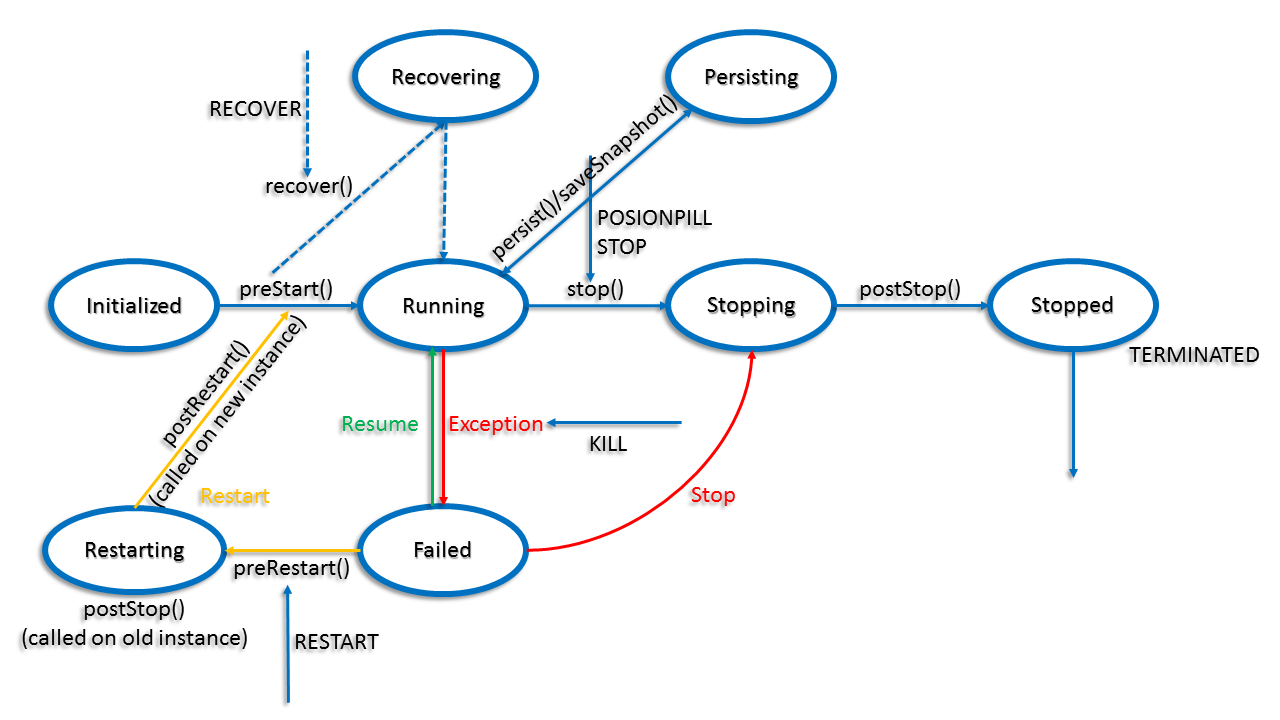
Fig. 6: Extended representation of the life cycle of an actor (cp. [8])
A supervisor strategy returns one of four directives (SupervisorStrategyDirective): RESUME, RESTART, STOP and ESCALATE. Further steps of the life cycle are TERMINATED, RECOVER, ACTIVATE and DEACTIVATE (see also Fig. 6). Stopping and restarting of the actors is asynchronous. By default, an actor is restarted at most three times within two seconds (maxRetries, withinTimeRange in the configuration).
RESUME: In this case, the supervisor remains passive. The actor can continue his activities undisturbed [8].STOP:- To all children, the message
STOPis sent (recursive process, if the children also have children) so they can terminate. Use ofwatch, to observe that all children have terminated. - Call of
postStop.
- To all children, the message
TERMINATED: The actor is stopped.RESTART:PreRestartis called at the current instance.- To all children, the message
STOPis sent (recursive process, if the children also have children) so they can terminate. Use ofwatch, to observe that all children have terminated. - Call of
postStopat the current instance, after all children have finished and confirmed this with theTERMINATEDmessage. - Instantiate a new instance with the actor’s factory. It is ensured that the
ActorIdis maintained. - Call of
postRestart(withpreStart(with optionalrecover) for the new instance.
ESCALATE: If a supervisor is unclear about the correct strategy in the event of a specific error, he can pass it on to his superior supervisor for clarification.RECOVER: The actor will be recovered to its last state. Novel events can lead to an update of the actor’s state.ACTIVATEandDEACTIVATE: Activates or deactivates the actor (messages will be or no longer be processed). The current explained directives remain deliverable, even when the actor is deactivated.
Important Actor Types
Section titled “Important Actor Types”Important actor types will be presented next, derived from the class Actor. The class Actor is abstract.
ActorGroupMember (Interface)
Section titled “ActorGroupMember (Interface)”The use of this interface signals to the ActorSystem that the correspondingly implemented actor is a member of a group. This is taken into account when distributing the actors to the threads. Actors belonging to a group are held together on a thread. The basic idea behind this has been explained in our papers (see [9][10]). Inter-communication between threads is more expensive than pure intra-communication (within the same thread). This applies to the default runtime.
ActorWithGroup
Section titled “ActorWithGroup”This class implements the interface ActorGroupMember.
ResourceActor
Section titled “ResourceActor”Workload tasks should not be performed within the ActorSystem, because they block the reactive system, and it is no longer responsive. Therefore resource actors are provided. These special actors are executed in a separate thread pool (maxResourceThreads), thus avoiding disturbances within the ActorSystem. Typical examples are clients for MQTT or databases, or a connection to a large language model.
StatelessResourceActor: messages can be processed in parallel.StatefulResourceActor: processes its messages one after the other.
The constructors of ResourceActor with the parameter stateful are deprecated, use one of the two classes instead. With virtualResourceThreads(true) in the configuration, resource actors are executed on virtual threads instead of the platform thread pool.
BehaviourActor
Section titled “BehaviourActor”An actor whose behaviours are return values: every behaviour handles a message and returns the next one. See Behaviours as return value.
PseudoActor
Section titled “PseudoActor”A PseudoActor is a mediator between the outside world and the ActorSystem. It allows communication with the actors within the actor system from outside. Unlike the other actors, the PseudoActor has its own message queue, in which the messages of different actors can then be stored by the ActorSystem. To be able to process received messages, run, runOnce or runAll must be called manually. Variants with RxJava are part of the actor4j libraries.
Actor pods encapsulate a subdomain of an application, can be deployed at runtime, replicated and sharded. They are described in a separate chapter: Pods.
Architecture of the Core Components
Section titled “Architecture of the Core Components”Now, the core components of actor4j are presented from the user and developer perspectives.
User’s Point of View
Section titled “User’s Point of View”The average user of actor4j will mainly work with the classes ActorSystem (or ActorService for a server) and the different actor classes (Actor, ActorGroupMember, ResourceActor, PseudoActor, PersistentActor). Possibly, the user will change the supervisor’s strategy. A timer (ActorTimer, system.timer()) should also be valuable in different situations. For larger applications, the logic can be encapsulated in pods.
Developer’s Point of View
Section titled “Developer’s Point of View”Every actor is wrapped by an ActorCell, which holds its state in the system (address, parent, children, behaviour stack). The ActorSystem holds the actor cells, the ActorMessageDispatcher places a message in the queue of the receiver, and the ActorExecutorService provides the execution units that process the messages. The SDK defines these foundation types, each runtime implements them (see Fig. 7). The parts shared by the runtimes are located in actor4j-core-runtime-base.
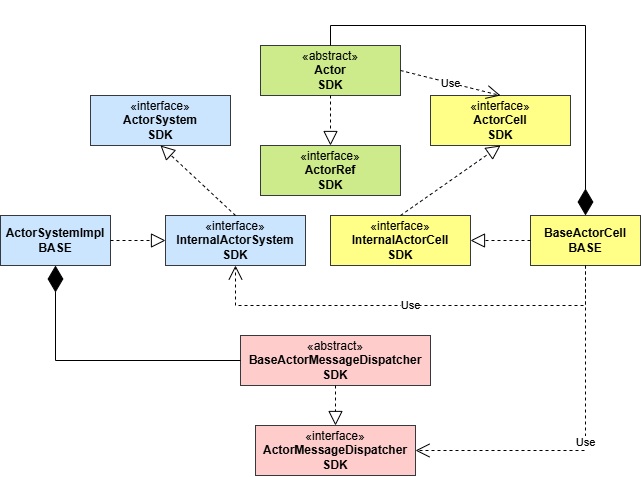
Fig. 7: Foundation types: actor, actor cell, actor system and dispatcher (© 2025 IEEE, from [10]). Note: in the code, BaseActorMessageDispatcher is located in actor4j-core-runtime-base.
References
Section titled “References”[1] Lightbend (2015). Actors. UntypedActor API. http://doc.akka.io/docs/akka/2.4/java/untyped-actors.html
[2] EPFL (2015). Pattern Matching. http://docs.scala-lang.org/tutorials/tour/pattern-matching.html
[3] Lightbend (2015). Actors. HotSwap. http://doc.akka.io/docs/akka/2.4/java/untyped-actors.html#untypedactor-hotswap
[4] Lightbend (2015). Persistence. http://doc.akka.io/docs/akka/2.4/java/persistence.html
[5] Joe Armstrong (2013). Programming Erlang. Software for a Concurrent World (Pragmatic Programmers). Pragmatic Bookshelf. Pages 398-399
[6] Lightbend (2015). Supervision and Monitoring. http://doc.akka.io/docs/akka/2.4/general/supervision.html
[7] Lightbend (2015). Fault tolerance. http://doc.akka.io/docs/akka/2.4/java/fault-tolerance.html
[8] Derek Wyatt (2013). AKKA Concurrency. Artima Inc. Pages 160-164.
[9] D. A. Bauer and J. Mäkiö, “Actor4j: A Software Framework for the Actor Model Focusing on the Optimization of Message Passing,” AICT 2018: The Fourteenth Advanced International Conference on Telecommunications, IARIA, Barcelona, Spain 2018, pp. 125-134, [Online]. Available from: http://www.thinkmind.org/articles/aict_2018_8_10_10087.pdf
[10] D. A. Bauer and J. Mäkiö, “Multi-Runtime Actor Model Implementation and Benchmarks,” IECON 2025 – 51st Annual Conference of the IEEE Industrial Electronics Society, Madrid, Spain, 2025, https://doi.org/10.1109/iecon58223.2025.11221487